
Top 5 Refurbished Gaming Laptops for 2025
9th May 2025
Morgan Computers Admin
Your choice of laptop can seriously make or break your gaming experience. As a tech expert at Morgan Computers with over a decade of experience testing and recommending devices, I’ve seen firsthand how much gaming performance you can get for your money by buying smart.
In this guide I’ll explain what really matters in a refurbished gaming laptop - and then highlight five of our favourite refurbished gaming-capable laptops. I’ll show you each machine’s specs in a quick table, explain its strengths and weaknesses, and help you decide which one fits your needs.
We’ll also touch on why refurbished laptops are reliable and a better alternative to buying new (cost savings, environmental benefits, and reliable 12-month warranties). Basically, more spec for your buck!
What to Look for in a Gaming Laptop
Okay, let me go back to basics here for a second. When you’re shopping for a gaming laptop, the key specs you need to look at are CPU, GPU, RAM, and display characteristics.
In a gaming laptop, the graphics card (GPU) is usually the most important component, because modern 3D games rely on fast graphics processing. Look for a dedicated graphics card (GPU) (for example an Nvidia GeForce GTX/RTX or an AMD Radeon) with as much video memory (VRAM) as possible – at least 4GB, ideally 6–8GB for newer titles.
The processor (CPU) is also important for gaming, especially in strategy or simulation games and for high framerates. A fast multi-core processor (such as an Intel Core i5/i7 H-series or an AMD Ryzen 5/7 H-series) will help in CPU-intensive scenes and overall system responsiveness.
Here’s my ultimate checklist for a gaming laptop:
- GPU (Graphics): Dedicated graphics card with plenty of VRAM. This is the workhorse for rendering 3D games.
- CPU (Processor): Fast cores and high clock speed. Quad-core or better (and 6 cores if you can) will keep up with modern engines.
- RAM (Memory): At least 16GB is highly recommended to avoid stuttering when multitasking or playing heavy games. But if you can afford it, 32GB is ideal and will make a noticeable difference during gameplay.
- Display: Aim for 1920×1080 (Full HD) resolution or higher, and a 120–144Hz refresh rate if possible. A higher refresh rate (for example 144Hz) means the screen updates 144 times per second, which makes fast-paced games look much smoother and can give you higher FPS in practice. In fact, Intel’s gaming guides note that “playing games at a higher refresh rate can have a substantial impact on your gaming experience” for competitive titles.
- Storage: A solid-state drive (SSD) is very important for fast load times. Aim for at least a 256GB SSD; some laptops also include a secondary HDD (hard desk drive) - more on that below.
- Build/Cooling: Good cooling is crucial in a gaming laptop. Look for a robust build and strong fans/heatsinks. A heavier “workstation” style laptop often has better cooling (but weighs more).
In a nutshell, for gaming you want a balance of a strong dedicated GPU and a solid CPU, plus a high-refresh screen and enough RAM. These specs matter more for gaming than for typical work or school tasks, because games push the hardware harder.
Got all that? Hopefully I haven’t lost you just yet. With these specs in mind, let’s take a look at my top 5 recommendations for the best refurbished gaming laptops.
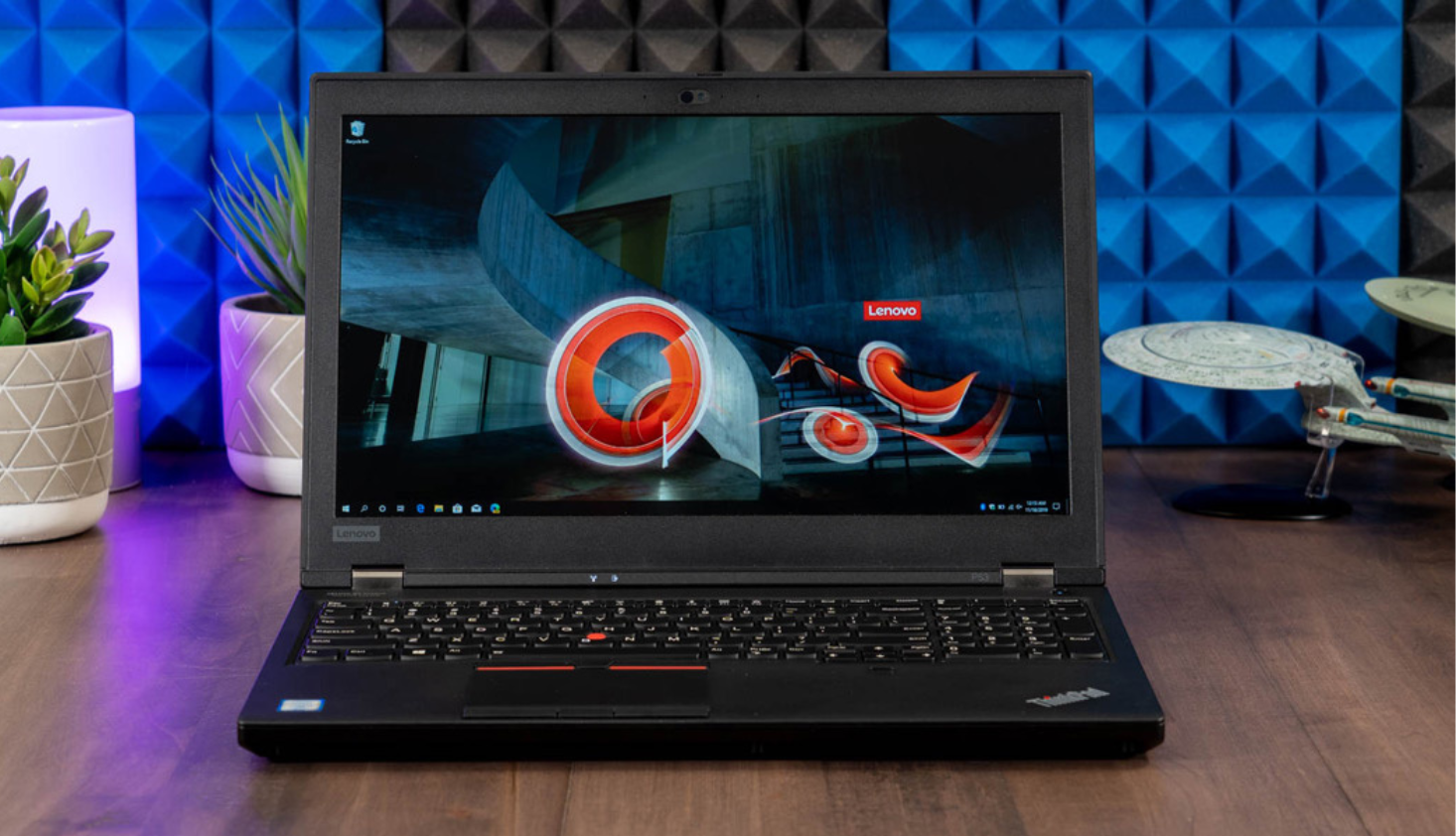
Pick 1: Lenovo ThinkPad P53 (15.6-inch): Balanced Performance and Portability
|
Feature |
Specification |
|
CPU |
Intel Core i7-9850H (6 cores, up to 4.6GHz) |
|
GPU |
NVIDIA Quadro (professional GPU) 4GB |
|
RAM |
32GB DDR4 |
|
Storage |
512GB SSD |
|
Display |
15.6″ Full HD (1920×1080) IPS (likely 144Hz) |
|
OS |
Windows 11 Pro |
The ThinkPad P53 is a 15.6-inch mobile workstation that strikes a great balance. It has a 9th-gen Core i7 CPU (6 cores, 12 threads) and a professional Nvidia Quadro GPU with 4GB VRAM.
Despite the “workstation” badge, it can handle games very well. It comes with a hefty 32GB of RAM and a fast 512GB SSD, so multitasking and loading games is no problem.
Performance
The P53 can run modern games smoothly at 1080p (and even some at high settings) thanks to its strong CPU and Quadro GPU.
It may not match the latest RTX gaming laptops in raw FPS (because the Quadro is tuned for professional apps), but it’s easily capable for most games.
The 15.6″ display is likely a Full HD panel at 120–144Hz, which means buttery motion in fast games. Overall, you get near-desktop power in a semi-portable package.
Portability
At around 2.8–3.0 kg, the P53 is on the heavier side of “laptop” but lighter than many 17″ machines.
Its chassis is very sturdy (ThinkPads are known for their build quality), and the keyboard is comfortable for long sessions. Battery life is modest (around 5–8 hours in mixed use), which is typical.
Who I recommend it for
This is an excellent choice for someone who wants strong performance without going to a massive 17″ machine.
For example, a gaming enthusiast or creative professional who might also work on photo/video editing or 3D content – the P53’s ample CPU power and RAM help with those tasks, while its GPU handles games.
Compared to our larger 17″ picks below, the P53 offers similar power in a smaller size.
How does it compare?
Unlike the larger ThinkPad P71 (below), the P53 has a newer generation CPU (9850H vs 7820HQ) and 6 cores instead of 4, so it will perform better in CPU-heavy tasks. It’s also more portable.
On the other hand, the P71 has double the GPU memory (8GB vs 4GB), which can help in very demanding 3D applications or high-resolution gaming. For everyday gaming, though, the P53’s specs are more than enough.
You can view the full Morgan Computers listing for the ThinkPad P53 for current pricing and stock.
Pick 2: Lenovo ThinkPad P71 (17.3-inch) – Powerhouse Desktop Replacement
|
Feature |
Specification |
|
CPU |
Intel Core i7-7820HQ (4 cores, up to 3.9GHz) |
|
GPU |
NVIDIA Quadro (workstation GPU) 8GB |
|
RAM |
32GB DDR4 |
|
Storage |
512GB SSD |
|
Display |
17.3″ Full HD (1920×1080) IPS |
|
OS |
Windows 10 Pro |
The ThinkPad P71 is essentially a desk-bound performance beast. Its 17.3-inch display and hefty 32GB of RAM make it perfect for heavy tasks.
Under the hood is a 7th-gen Core i7 (the 7820HQ) and a top-end Quadro GPU with 8GB of VRAM (Our stock at Morgan often has the Quadro P3200 or similar.) This extra VRAM and large screen size let the P71 tackle very high-detail gaming or professional 3D/VR workloads.
Performance
In raw power, the P71 is right up there – it was originally a flagship mobile workstation.
The Quadro GPU (with 8GB) is particularly well-suited to high-resolution 3D and VR; in fact, these laptops were certified VR-ready. You can expect excellent performance in most games at 1080p.
One catch: the CPU is older (Kabylake) and only 4 cores, so it won’t boost as high as newer chips (max ~3.9GHz), and it may lag behind newer i7s in pure CPU tests. Still, it’s no slouch for gaming and content creation.
Portability
This is not a laptop you’ll carry on a daily commute. The P71 weighs over 3.5 kg and is nearly 4 cm thick.
It’s very durable, but think of it more like a semi-portable desktop. Battery life is limited (around 4-5 hours idle, less under load). It’s best suited to being at a desk or moving occasionally.
Who I recommend it for
Choose the P71 if you want maximum screen real estate and GPU power, and you don’t mind the weight.
I’d recommend this model for a developer or gamer who also does CAD, video editing or VR work. The big 17″ display and Quadro GPU give a lot of workspace and graphics headroom. In gaming terms, it excels at bigger, more intense scenes.
How it stacks up
The P71’s main rival here is the P53. In practical terms, the P53 is more portable and has a newer CPU; the P71 has the edge in GPU memory and screen size.
If you mainly game and want a smaller laptop, the P53 is likely the better all-rounder. If you want a “desktop-replacement” experience for both gaming and professional workloads, the P71 delivers.
We regularly carry the ThinkPad P71 at Morgan Computers, so check out current stocks on the site.
Pick 3: HP ZBook 17 G3 (17.3-inch) – 6-Core Workstation with Big Screen
|
Feature |
Specification |
|
CPU |
Intel Core i7-6820HQ (6 cores, up to 3.6GHz) |
|
GPU |
NVIDIA Quadro (workstation GPU) 2GB |
|
RAM |
16GB DDR4 |
|
Storage |
500GB HDD + 256GB SSD |
|
Display |
17.3″ Full HD (1920×1080) |
|
OS |
Windows 10 Pro |
The HP ZBook 17 G3 is another large 17.3-inch workstation laptop.
It’s a generation newer than the Dell Precision M6800 (below) and comes with a 6-core i7-6820HQ (6th-gen Skylake) plus a mid-range Quadro GPU (often the Quadro M1000M/2000M series with 2GB VRAM).
The six CPU cores give it an edge in multi-threaded tasks over the 4-core i7s in the ThinkPads.
Performance
Thanks to the 6-core CPU, the ZBook 17 G3 is great at multitasking. The Quadro GPU here has only 2GB VRAM, so it’s less powerful for gaming than the GPUs in the ThinkPads or modern gaming laptops.
It will run most games at 1080p, but in very graphics-heavy titles you’ll need to drop to medium settings. The hybrid storage (256GB SSD + 500GB HDD) is a nice touch: the SSD boots Windows and games fast, while the HDD gives you room for extra files.
Portability
Like other 17″ machines, this is heavy (around 3.5 kg). Build quality is solid (HP’s ZBooks are rugged), and it has useful ports for professionals. Battery life is roughly similar to the P71 (around 5 hours light use).
Who I recommend it for
This is a good choice if you want a high-core-count CPU and a big screen without spending on top-tier GPUs. For example, architecture or engineering students who run simulations or CAD during the day and still want to game in the evening.
The ZBook’s 6 cores mean smoother performance in CPU-heavy workloads. On the flip side, if your priority is raw gaming FPS, the lower-end GPU means it will lag behind a laptop with a GTX/RTX card at high settings.
How it compares to other gaming laptops
Compared to the Dell M6800 (next), the ZBook’s CPU is newer (Skylake 6-core vs Haswell 4-core) but its GPU VRAM is smaller (2GB vs 4GB).
That means the ZBook can process game logic faster but will run out of graphics memory sooner. In practice, the ZBook 17 G3 is generally more capable for modern games than an M6800, despite the smaller GPU – thanks to its newer processor and SSD.
You can find our HP ZBook 17 G3 listing here if you want details or to buy it refurbished.
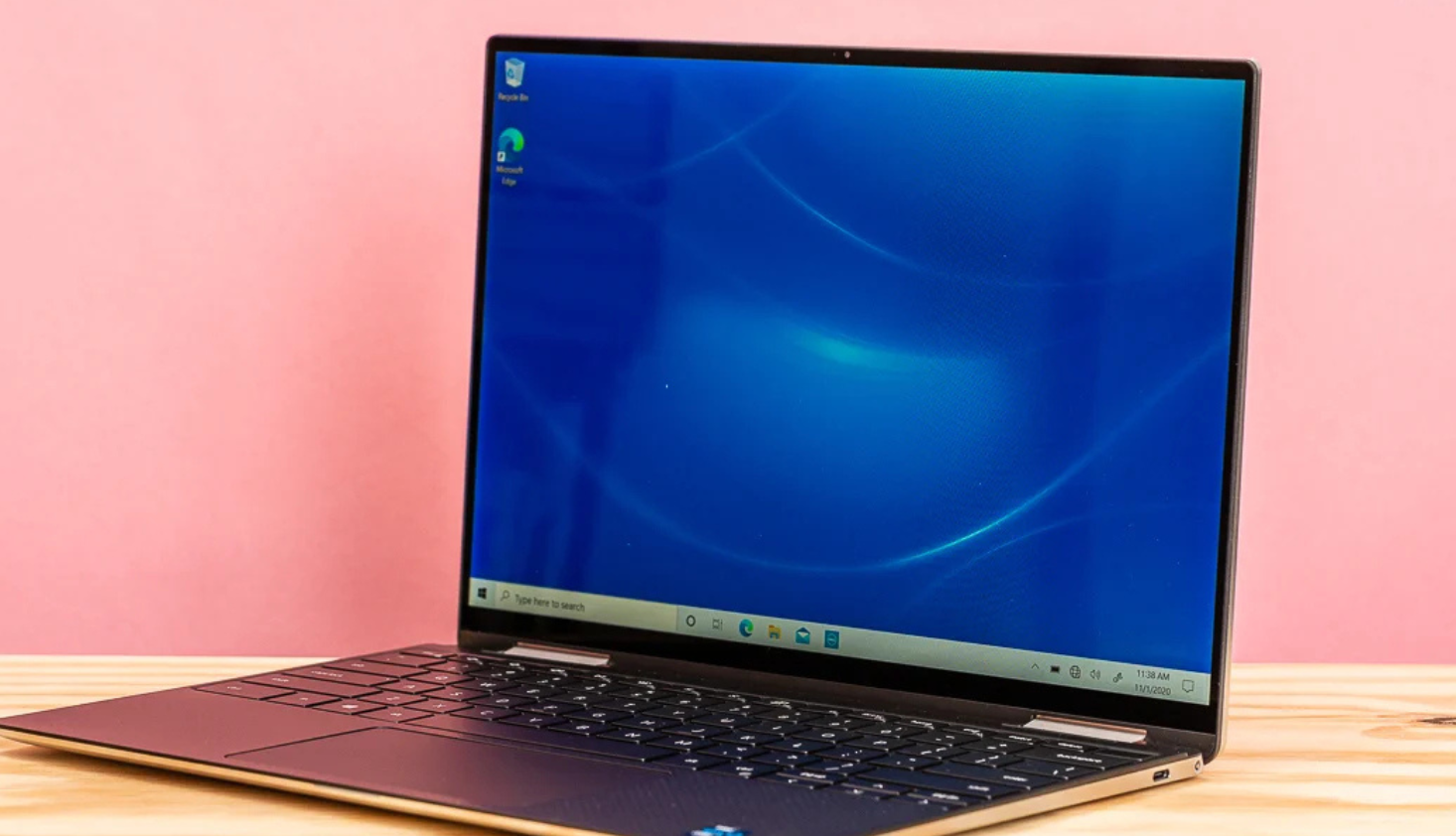
Pick 4: Dell XPS 13 9310 — Ultraportable Model for Light Gaming
|
Feature |
Specification |
|
CPU |
Intel Core i7-1185G7 (up to 4.80GHz, 4 cores) |
|
GPU |
Intel Iris Xe (integrated GPU) |
|
RAM |
16GB |
|
Storage |
512GB SSD |
|
Display |
13.3″ Ultra HD+ Touchscreen (3840x2400) |
|
OS |
Windows 11 Pro |
Hard-core gamers are probably screaming at me right now, but hear me out on this recommendation. Yes, it’s true that the Dell XPS isn’t a traditional gaming laptop, but it can be a great option for light gamers on a budget.
Performance
The Dell XPS comes with an 11th Gen Intel Core i7-1185G7 processor, which is a high-end chip for thin laptops. It runs up to 4.8GHz and includes four cores, so it can multitask well and offers a good bit of performance headroom.
Paired with 16GB of RAM and a 512GB solid-state drive, you’ve got more than enough memory and fast storage for games, apps, schoolwork, and general multitasking.
It’s also got a quality build, with an aluminium chassis that feels as premium as it looks.
In terms of processing, Iris Xe is a noticeable step up from older Intel solutions. It can comfortably handle popular titles like Minecraft, The Sims 4, Stardew Valley, Hades, and even a bit of Fortnite or Valorant — as long as you're not pushing everything to ultra settings.
You’ll get solid frame rates at lower or medium settings, which is perfectly fine if you’re just a casual gamer.
What to keep in mind
But let’s talk about limitations, because this isn’t a gaming laptop in the traditional sense. The main drawback is the lack of a dedicated graphics card.
Since the Iris Xe shares memory with the CPU, it won’t deliver the kind of performance you’d need for big, modern titles like Cyberpunk 2077 or Call of Duty: Warzone.
You can technically install them, but you’ll be dialing settings down heavily, and even then, performance may still struggle.
Another thing to note is the screen size. While the resolution is outstanding, the 13.3-inch panel can feel a bit cramped for gaming, especially if you’re used to a larger monitor.
It’s also got a standard 60Hz refresh rate, so you won’t get the ultra-smooth motion you see in high-refresh-rate gaming laptops.
Thermals can be another small sticking point. Because this laptop is so thin, it doesn’t have as much room to cool itself under sustained load. That means it may run a little hot and throttle performance slightly if you’re gaming for long periods — nothing catastrophic, but worth knowing.
Portability
The XPS excels in portability. It has a beautiful 13.3-inch Ultra HD+ touchscreen with a razor-sharp 3840x2400 resolution, and the overall design is slim and lightweight.
If you’re a student lugging your laptop between lectures or a remote worker looking for something you can travel with, it’s a dream to carry around.
Who I recommend it for
Overall, though, if you’re someone who plays games like League of Legends, older titles like Skyrim, or casual strategy games like Civilization VI or Age of Empires, this machine will do the job.
It’s especially well-suited to students or professionals who want one device that can switch between productivity and play without breaking the bank or your back.
For under £500, you’re getting a high-resolution display, a premium chassis, and just enough graphical power to make light gaming enjoyable. That’s not a bad deal at all!
How it compares to other gaming laptops
Like I said, the Dell XPS doesn’t have the same processing or cooling capability that gaming-specific models do. But, for light gamers that will use the laptop for something else as well, it does the job perfectly well.
You can find the Morgan Computers Dell XPS listing here to check for current stock.
Pick 5: Lenovo Legion 5i (15.6-inch) – Modern RTX Gaming on a Budget
|
Feature |
Specification |
|
CPU |
Intel Core i5-10300H (4 cores, up to 4.5GHz) |
|
GPU |
NVIDIA GeForce RTX 2060 (gaming GPU) 6GB |
|
RAM |
16GB DDR4 |
|
Storage |
512GB SSD |
|
Display |
15.6″ Full HD (1920×1080) IPS (144Hz likely) |
|
OS |
Windows 10 |
For a taste of a “true gaming” laptop in the refurb market, take a look at the Lenovo Legion 5i (2020 model). It’s a consumer gaming laptop with an Intel Core i5-10300H and a GeForce RTX 2060 GPU – a classic mid-range gaming setup. It comes with 16GB RAM, 512GB SSD and Windows 10.
Performance
This setup is well-optimized for 1080p gaming. The RTX 2060 (6GB VRAM) will easily outperform all the professional GPUs above in most games.
It also supports ray-tracing and DLSS. You can expect very high frame rates on today’s games at medium-to-high settings. The 144Hz display (common on the Legion) means the visuals will be extremely smooth in action games.
The quad-core i5 is plenty capable for gaming, though it’s not as powerful as the higher-end i7s above – in some CPU-bound scenarios you might see it limit performance slightly.
Portability
The Legion 5i is about 2.4 kg – significantly lighter and more modern-looking than the older workstations.
Build quality is solid for its price bracket (some of it plastic, but it feels sturdy). Battery life in gaming laptops is usually modest, but this model should manage 5–6 hours of light use.
Who I recommend it for
This laptop is ideal for a gamer who wants high frame rates and modern graphics features on a budget. If you spend a decent amount of time gaming and you notice the details like high-quality graphics, this one will suit your needs better than the previous models.
The trade-offs are that it’s less of a business machine – the keyboard and build aren’t as rugged, and it doesn’t have a wide colour-gamut display (but that’s fine for gaming).
How it stacks up
Against the above workstations, the Legion 5i’s GeForce GPU is built for games rather than professional apps, so it will give you higher FPS in direct comparisons.
For example, an RTX 2060 in this Legion will outperform the older Quadros in most games at the same settings. The CPU is weaker than the i7-9850H in the ThinkPad P53, but in many games the difference will be minor because the GPU is the bottleneck.
If you want raw gaming power and a high-refresh panel, the Legion 5i is the pick of this list – and it shows how far refurbs have come.
Why Buy a Refurbished Gaming Laptop?
All the laptops above are commonly available refurbished, which means they’re pre-owned and restored to full working order. There are big advantages to this approach.
For starters, you’ll save 30-50% off the brand new price. In practice, this means you can afford higher-end specs (like 32GB RAM or a professional GPU) at a midrange price.
For example, many of the models I’ve mentioned in this list were originally retailed for £3000–£4000 new, but now my team and I at Morgan sell them for a fraction of that.
Even though you’re paying less, you can still be sure that the model is tested and certified to ensure performance comparable to new products. In other words, you aren’t getting a beaten-up clunker - refurbishers like us clean, repair and test every unit.
We also swap in fresh batteries or SSDs as needed, and every laptop comes with a 12-month warranty for peace of mind.
The environmental impact is another big one. Refurbishing extends a laptop’s life, which means fewer devices in landfill. Buying refurbished reduces electronic waste, and Morgan Computers is proud to be part of that circular economy.
Finally, in my experience I can say refurbished gaming laptops are a smart value. You get great performance and reliability (we wouldn’t sell anything we wouldn’t use ourselves), while saving a ton of money.
For example, the ThinkPad P53 above offers like-new performance but at perhaps 40–50% off its original price. I’ve seen customers grab laptops like these and wonder why they ever bought new. Something worth thinking about!
And if you’re still on the fence, read my explainer on why refurbished laptops are becoming more popular than ever.